STL Buddy LogoSTL Buddy
Convert Image to STL

Convert Any Image to an STL File for 3D Printing

Turn flat PNG or JPG images into 3D‑printable STL files without complex CAD software. STL Buddy gives you a fast, browser‑based way to convert an image to STL using modern AI‑powered depth inference.

Download the iOS App

QR Code to download STL Buddy iOS appDownload on the App Store
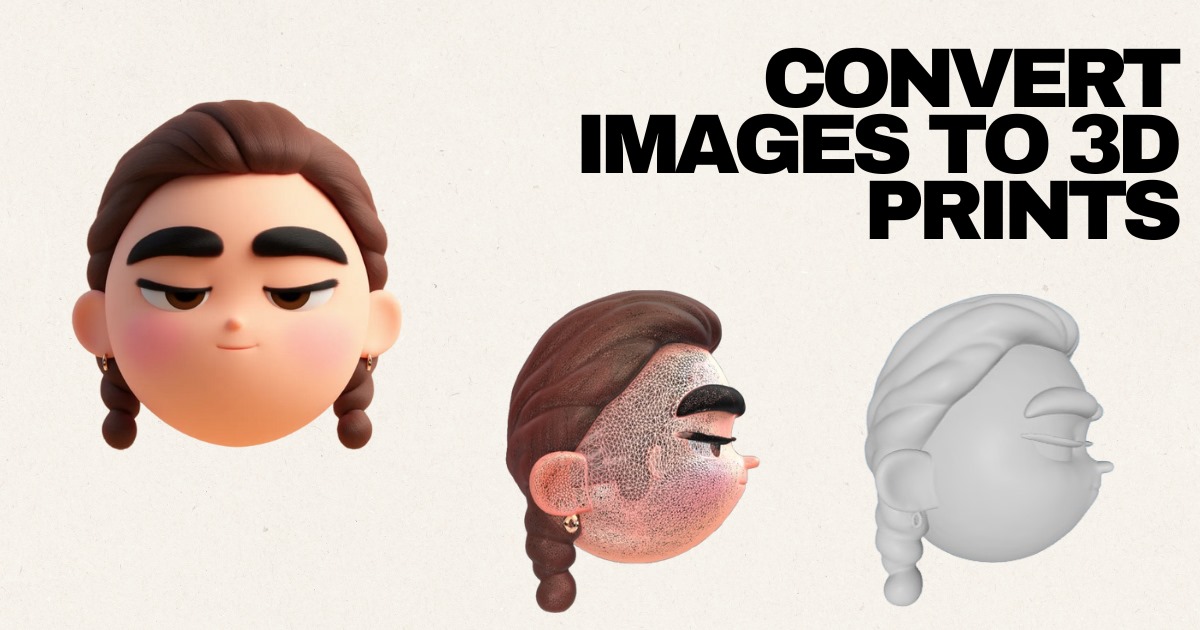
A 3D model rising from a flat image, showing how you can convert an image to an STL file for 3D printing.

Convert Image to STL Directly in Your Browser

Upload a PNG or JPG to convert an image to STL in just a few clicks. STL Buddy runs in the browser and uses an AI‑assisted image‑to‑STL pipeline to create printable reliefs and 3D models.

Drag & Drop your image to convert it to STL

or click to choose a PNG or JPG from your device

PNG, JPG up to 10MB • Best for logos, icons, portraits, and simple artwork

Try STL Buddy on iOS

Scan real-world objects with your iPhone camera and convert them into 3D-printable STL files instantly. Available now on the App Store.

QR Code to download STL Buddy iOS appDownload on the App Store

Image‑to‑STL Examples: From Flat Artwork to Printable Models

These examples show what happens when you convert an image to STL: flat PNG or JPG graphics become 3D‑printable reliefs, characters, and accessories.

AI‑Enhanced Character Relief (Image to STL)

Source: JPG

Controller Icon: Convert Image to STL for Accessories

Source: JPG

Cartoon Illustration to Printable STL

Source: JPG

Character Design: From Image File to STL Model

Source: JPG

Now Available on iOS

Take STL Buddy with you! Scan real-world objects using your iPhone camera and create 3D models on the go. Perfect for makers, designers, and creators.

QR Code to download STL Buddy iOS app
Download on the App Store

Scan QR code or click badge

Why Use STL Buddy to Convert Images to STL Files?

An image‑to‑STL workflow that works for beginners, hobbyists, and pros

  • Optimized for image‑to‑STL conversion: Convert an image to an STL file without learning full 3D CAD. Great for logos, portraits, reliefs, and simple prototypes.
  • Fast, browser‑based converter: No installs or plugins required—convert images to STL right in your browser on desktop or mobile.
  • AI‑assisted depth and relief: Go beyond basic heightmaps. Our pipeline infers depth and preserves important contours so your image‑to‑STL conversion produces a usable 3D mesh.
  • Secure, temporary uploads: Your images and STL files are stored securely and can be removed at any time, so you stay in control of your projects.

Who Should Convert Images to STL?

Common image‑to‑STL use cases from our users

  • 3D printing beginners who want a simple way to convert images to STL files without learning advanced CAD tools.
  • Hobbyists and makers turning 2D logos, icons, and sketches into keychains, coasters, badges, and engravings.
  • Graphic designers converting flat PNG or JPG artwork into 3D STL assets for clients or physical products.
  • Educators and students exploring how 2D‑to‑3D workflows work, from heightmaps to full relief models.
  • Small businesses converting brand assets or product concepts from images into quick, printable STL prototypes.

Tips for Better Image‑to‑STL Results

Prepare your image before you convert it to a 3D‑printable STL file

  • Start with a high‑resolution, high‑contrast image so your STL has clean edges instead of jagged geometry.
  • Use simple backgrounds and clear silhouettes; busy photos often produce noisy meshes that need extra cleanup.
  • Boost contrast and remove grain or artifacts in an editor before you convert the image to STL.
  • Logos, icons, text, and simple portraits usually convert to much cleaner STL files than cluttered photographs.
  • Always inspect the STL in a slicer (Cura, PrusaSlicer, Bambu Studio, etc.) and adjust scale or thickness before printing.

Convert Image to STL: Frequently Asked Questions

Learn what happens when you convert an image into an STL file, which images work best, and how to avoid common issues.

Ready to Convert an Image into a 3D‑Printable STL File?

Upload a PNG or JPG and convert your image to STL in just a few steps. Create lithophanes, logos, relief art, and more—no advanced 3D modeling skills required.

Or download our iOS app

QR Code to download STL Buddy iOS appDownload on the App Store