STL Buddy LogoSTL Buddy
Convert PNG to STL Online

Convert PNG to STL: Turn 2D Images into 3D‑Printable Models

Want to convert a PNG to STL without learning complex 3D software? Upload a PNG (or JPG) and STL Buddy will turn your 2D image into a clean, printable STL file—perfect for logos, badges, heightmaps, and simple 3D designs.

Download the iOS App

QR Code to download STL Buddy iOS appDownload on the App Store
A 3D model rising from a flat PNG image, visualizing the process to convert PNG to STL from 2D pixels into 3D geometry.

Convert PNG to STL in Your Browser (No Software Needed)

Use this free, browser‑based PNG‑to‑STL converter to go from flat artwork to a 3D model in minutes. Just upload a PNG or JPG, describe your image, and download a ready‑to‑slice STL file.

Drag & Drop your PNG image to convert it to STL

or click to choose a PNG or JPG from your device

PNG, JPG up to 10MB • Best for logos, icons, line art, and simple graphics

Try STL Buddy on iOS

Scan real-world objects with your iPhone camera and convert them into 3D-printable STL files instantly. Available now on the App Store.

QR Code to download STL Buddy iOS appDownload on the App Store

PNG to STL Examples: From Flat Images to 3D Models

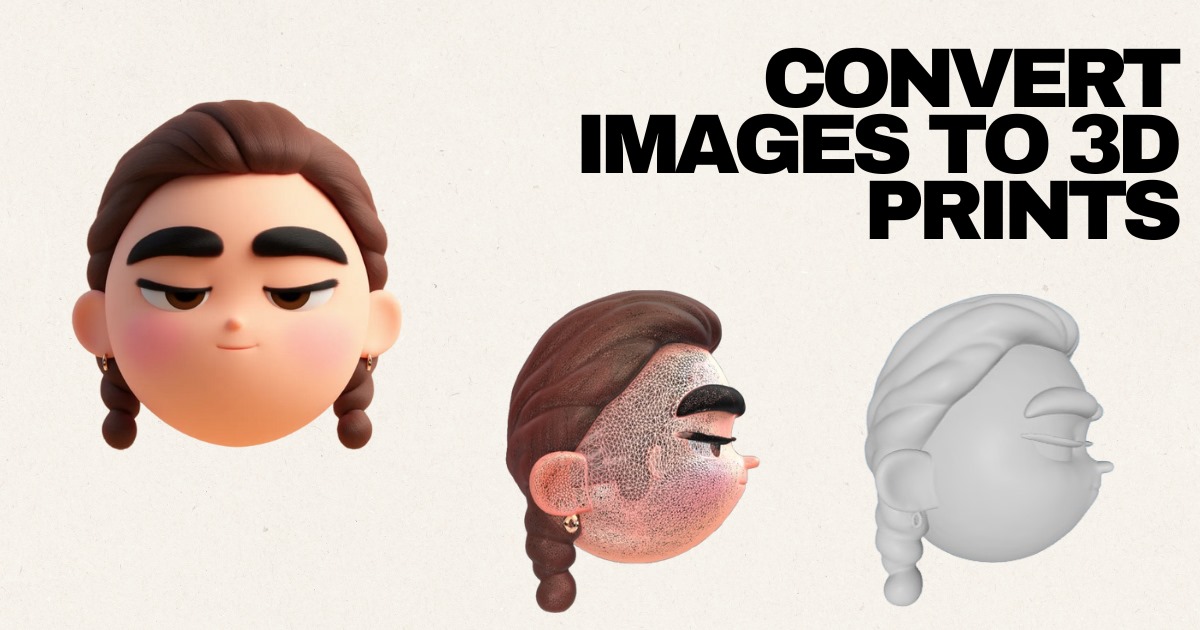
These examples show how you can convert a PNG or JPG into a printable STL file—turning characters, logos, and icons into real, 3D objects.

Superhero Character (PNG to STL Heightmap)

Source: JPG

3D Controller from Flat PNG‑Style Art

Source: JPG

Cartoon Character: 2D PNG to 3D STL

Source: JPG

Character Design: Convert Logo‑Style Art to STL

Source: JPG

Now Available on iOS

Take STL Buddy with you! Scan real-world objects using your iPhone camera and create 3D models on the go. Perfect for makers, designers, and creators.

QR Code to download STL Buddy iOS app
Download on the App Store

Scan QR code or click badge

Why Use STL Buddy to Convert PNG to STL?

A practical 2D‑to‑3D workflow for beginners, makers, and product designers

  • Purpose‑built PNG to STL converter: Turn flat PNG or JPG images into solid 3D STL geometry—without opening Blender, Fusion 360, or any other complex CAD tool.
  • Fast, browser‑based conversion: Upload, convert PNG to STL, and download your file from any modern browser. No installs, no plugins, no GPU requirements.
  • Smarter than basic heightmaps: Instead of a noisy one‑click heightmap, STL Buddy infers shape and thickness from your image to create more usable 3D models.
  • Secure, temporary uploads: Images and STL files are processed over encrypted connections and stored temporarily, so you stay in control of what you convert.

Who Should Convert PNG Images to STL Files?

Typical use cases for PNG‑to‑STL workflows

  • 3D printing beginners who want the easiest way to convert a PNG logo or icon to an STL keychain, badge, or tag.
  • Hobbyists and makers turning 2D artwork into custom coasters, signage, nameplates, and decorative reliefs.
  • Graphic designers who need to convert flat brand assets into 3D‑printable STL files for clients and prototypes.
  • Educators and students exploring 2D‑to‑3D conversion, heightmaps, and basic mesh editing without learning full CAD.
  • Small businesses converting PNG logos or product marks into physical prototypes and branded 3D prints.

How to Get Better Results When You Convert PNG to STL

Prepare your PNG or JPG before running the conversion

  • Use a high‑resolution PNG with crisp edges; low‑resolution images produce blocky or jagged STL geometry.
  • Increase contrast between foreground and background so the converter can clearly separate shapes when building the 3D mesh.
  • Remove busy gradients, textures, or photo noise in an image editor before you convert the PNG to STL.
  • Logos, silhouettes, icons, and line art almost always convert to cleaner STL files than complex photographs.
  • After converting PNG to STL, always open the file in a slicer (Cura, PrusaSlicer, Bambu Studio) to check scale, thickness, and printability.

Convert PNG to STL: Frequently Asked Questions

Answers to common questions about turning a PNG or JPG image into an STL file for 3D printing.

Ready to Convert a PNG to a 3D‑Printable STL File?

Upload a PNG or JPG now, add a short description, and STL Buddy will convert your 2D image into a printable STL model—without any 3D modeling experience.

Or download our iOS app

QR Code to download STL Buddy iOS appDownload on the App Store